ROADMAP
A better creative workflow, one update at a time.
Thechangelogis the record of what has shipped. This page is the other direction — what is being built now, what comes after it, and what is being explored without a date. The line is solid where the product has already walked and dashed where it intends to; the further down, the softer the promise.
FramioCam launch
ShippedV1.0.0 · MAY 2026
The first public release, on the Chrome Web Store. Capture, dress, export — the whole loop, on the machine it was captured on.
- Capture the visible viewport or the full scrollable page.
- OS window frames and styled backgrounds.
- Copy to clipboard or download a finished mockup PNG.
Annotations, history, sharper exports
ShippedV1.0.1 · JUNE 2026
The first feature update after launch — annotation tooling, undo history, and export polish.
- Annotation toolbar: arrows, boxes, blur, and text.
- Undo / redo history, up to ten steps.
- Export every queued screenshot as a single ZIP.
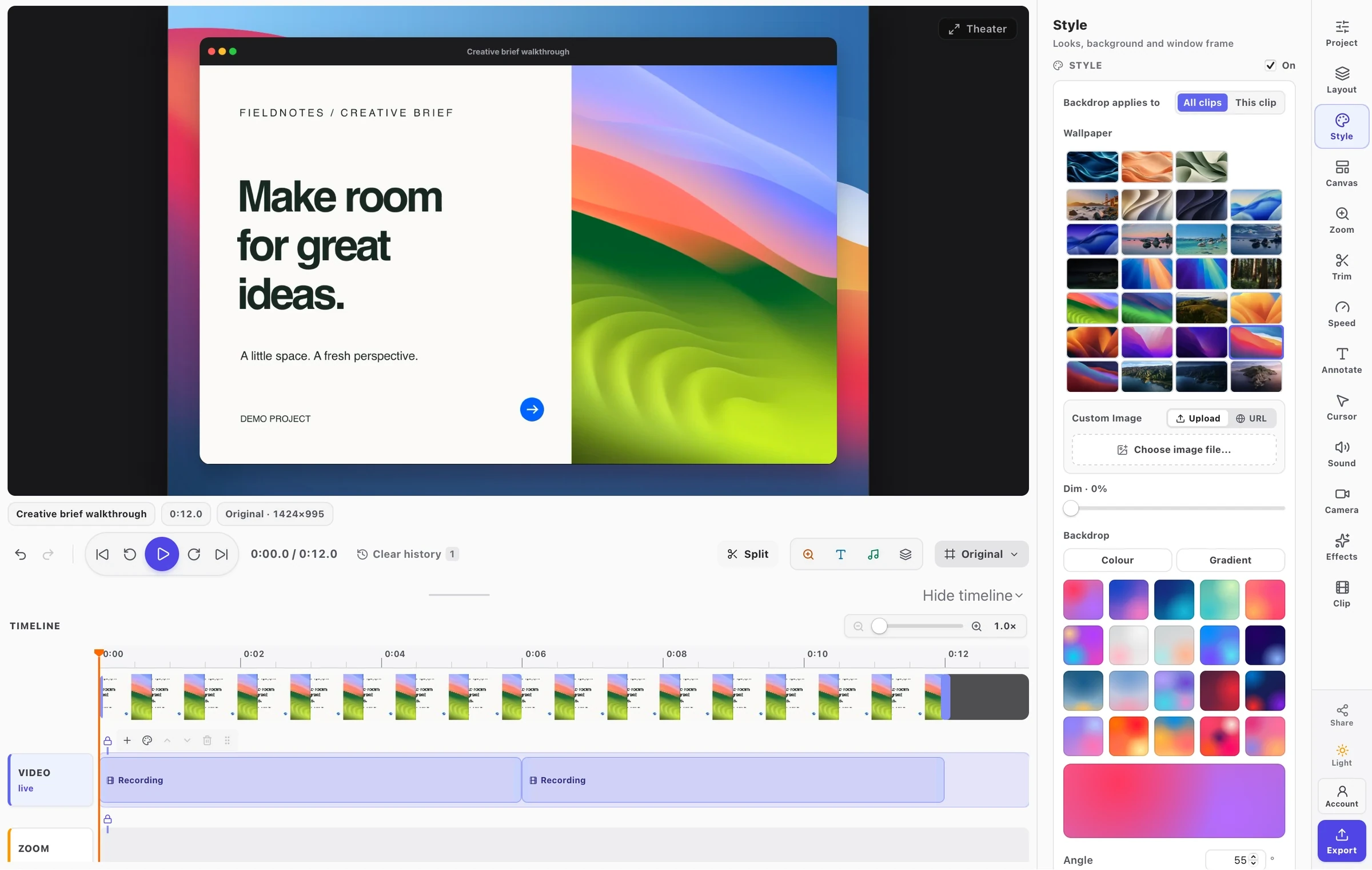
Screen recording, and a studio that edits it
ShippedV1.1.0 · SEPTEMBER 2026
The largest release since launch: FramioCam records now, and the studio that made screenshots beautiful edits video with the same hands.
- Record a tab or the whole screen, with microphone and webcam, from the popup.
- A real timeline: clips and lanes, split, trim, ripple delete, and transitions.
- Zooms generated from your own clicks, a drawn cursor and click ripples.
- Export MP4, WebM, GIF or a single still — and a library of everything made on the machine.
A timeline you can read, and a stage that lines things up
ShippedV1.1.1 · SEPTEMBER 2026
The timeline gets room, frames and magnetism; the canvas gets device frames, shapes and per-clip styling.
- Everything on the timeline and on the stage snaps to what is already there.
- Phone and tablet frames, and canvas shapes for YouTube, TikTok and Instagram.
- A backdrop per clip, and a camera free at any size in every layout.
- Exports dramatically faster on long projects.
Your work on every device
ShippedV1.1.2 · SEPTEMBER 2026
Recordings, screenshots and whole projects can live in your own cloud as well as on the machine. Everything still starts here; syncing is something you switch on, one provider at a time, and nothing is ever deleted on either side.
- Google Drive, Dropbox and OneDrive — each switched on as it becomes available.
- Two-way sync, and a shareable link for any recording or screenshot — view-only, editable, or private.
- Project Sync: a project, undo steps included, picks up on another computer exactly as you left it.
- A screenshot editor laid out like the video editor, with your own pictures dropped straight in.
A lighter, faster extension
ShippedV1.1.3 · SEPTEMBER 2026
Captures finish faster, the extension uses less of your bandwidth, drawing on long screenshots is smooth, and you always know what happened when you copy.
- The extension is 60–84% smaller, so every page loads faster and the popup opens quicker.
- Captures are saved once at the end instead of being rewritten as you shoot, and smooth drawing even on long full-page screenshots.
- Copy always tells you if it worked — no silent failures or claiming success when the browser blocked it.
- Progress cards show what is happening while FramioCam captures and saves, without getting in the picture.
What you preview is what you export
ShippedV1.1.4 · SEPTEMBER 2026
Marks and transitions match the exported file, with more control over arrows, audio and cloud projects.
- Fourteen arrow shapes, with controls to bend, rotate and resize them.
- Trim audio clips from either edge on the timeline.
- Cloud drives have their own screen; remove an unreadable remote project without deleting its local copy.
- Marks, camera and window-frame transitions, Mosaic and Circle Open export as previewed.
A screenshot canvas you can compose
ShippedV1.1.5 · SEPTEMBER 2026
Arrange the screenshot, annotations and decorative shapes anywhere on a freeform canvas, with precise shadows and layers.
- Move and proportionally resize the screenshot, with snapping guides and keyboard nudges.
- Place annotations on the backdrop as well as over the picture.
- Thirty-eight decorative shapes with solid or gradient fills, strokes and layer controls.
- Detailed shadows, with edits preserved through undo, redo and reopening the editor.
More control over captures and the studio
ShippedV1.1.6 · SEPTEMBER 2026
Stop long captures when you have enough, build layered gradients, and style screenshots with editable SVG artwork and local fonts.
- Stop & save keeps the portion of a full-page capture already taken.
- Custom gradients with colour stops and soft light layers, shared by both studios.
- Editable SVG artwork and seven locally bundled fonts for screenshot annotations.
- Video backdrops gain patterns, grain and lighting, carried through to export.
Colour cards, drawing and a tidier timeline
ShippedV1.1.7 · OCTOBER 2026
Add colour clips to the timeline, scroll and draw while recording, and keep overlapping audio, captions and marks in separate rows.
- Colour clips with solid, gradient, image or pattern fills that trim, split, fade and transition like recordings.
- Auto-scroll the page or a panel while recording, with adjustable speed and keyboard controls.
- Draw pen strokes, ellipses and rectangles on the page, then edit them as annotations in the studio.
- A simpler Screenshot or Record popup, automatic timeline rows, and fixes for caption size, gap exports and thumbnails.
Quicker captures and clearer editing
ShippedV1.1.8 · OCTOBER 2026
Single captures return the popup to Home, copying is available where the capture finishes, and blur regions are easier to draw and adjust.
- Copy screenshots from completion cards and multi-page capture results, with clear success or failure feedback.
- Draw and resize blur regions, with consistent strength controls in both studios.
- Ordinary webpages remain eligible for capture when their address merely mentions a web-store URL.
- Recording setup explains the export account requirement, and storage notices explain local and cloud copies.
Maintenance update
ShippedV1.1.9 · OCTOBER 2026
A small maintenance release following v1.1.8.
Text that behaves like text
In progressIN THE WORKS
On-device text recognition, so the words inside a capture become words again. The model runs in the browser — nothing leaves the machine, which is the only way this feature could ship here at all.
- Copy any text straight out of a screenshot.
- Redact by finding and erasing text, not just blurring it.
- Find a capture by the words inside it.
Captions from your own voice
PlannedNEXT
Speech recognised on the machine, the same way text will be — so a recording carries its own subtitles without its sound ever leaving the browser.
- Captions made from the microphone track, placed on the timeline as text you retime and restyle.
- Edit the transcript to edit the video: delete a sentence and the cut follows.
- Take out the ums and the long pauses in one pass, with every cut shown before it is made.
- Burn captions into the picture, or export them beside the file as SRT or VTT.
Sound worth listening to
PlannedNEXT
The picture already gets a studio. The voice over it should get one too — cleaned, levelled and mixed on the machine, in the preview and in the file alike.
- Noise suppression for the microphone, after the recording as well as during it.
- One loudness level that suits YouTube and a Slack thread alike.
- Music that ducks under your voice on its own.
- Record a voice-over straight onto the timeline, over a recording already made.
A timeline that does more of the cutting
PlannedAFTER THAT
Zooms already come from your clicks. The same recorded pointer and the same timeline can take on more of the work that is still done by hand.
- Zoom paths with keyframes — pan across a page instead of jumping between two points.
- A smoothed cursor, and a 9:16 reframe that follows it when a wide recording goes vertical.
- Chapters and markers on the timeline, exported as YouTube chapters.
- Freeze frames, and several blocks selected and moved together.
One brand kit for both studios
PlannedAFTER THAT
Colours, fonts, logo and a look, set once — and the screenshot editor and the video editor both reach for it, so everything you make looks like it came from the same place.
- A brand kit shared by screenshots and video.
- Title cards, lower thirds and an outro, drawn by the same renderer as everything else.
- Project templates: start a new recording with the layout, look and intro of the last one.
Interactive demos
ExploringNO DATE YET
Every recording already knows where you clicked. The same clicks could build a step-by-step, click-through demo — made on the machine, and a file you host wherever you like.
- Steps made from recorded clicks, each with its own picture and caption.
- A standalone HTML demo, or a PDF guide, from the same project.
- Export straight to your connected cloud with a share link.
Beyond Chrome
ExploringNO DATE YET
The honest state of it: nothing here is scheduled. The list is ordered by how much of the engine each one can already use.
- Edge — the same engine, mostly a listing.
- Firefox — the parts that assume Chrome, rewritten.
- Safari — the hardest one, and the last.
Something you need that is not on this line? Write tosupport@framiocam.comand say so — it is read.